
Managing a sales pipeline without proper software is like navigating without a map. You need visibility into where prospects stand, what actions to take next, and which deals deserve priority. But here's the challenge: you need software to scale, yet budget constraints often prevent investment until you've already scaled.
The good news? Today's free sales pipeline management tools offer powerful capabilities that rival paid alternatives—if you know which ones to choose and how to implement them effectively. After helping dozens of companies optimize their sales processes, we've identified the platforms that deliver genuine value without hidden costs or feature limitations that cripple your workflow.
Key Takeaways
- Apollo stands out with built-in prospecting data and pipeline management in one platform, eliminating the need for multiple tools
- Most free CRM platforms offer only data storage—you'll still need separate prospecting tools unless you choose an all-in-one solution
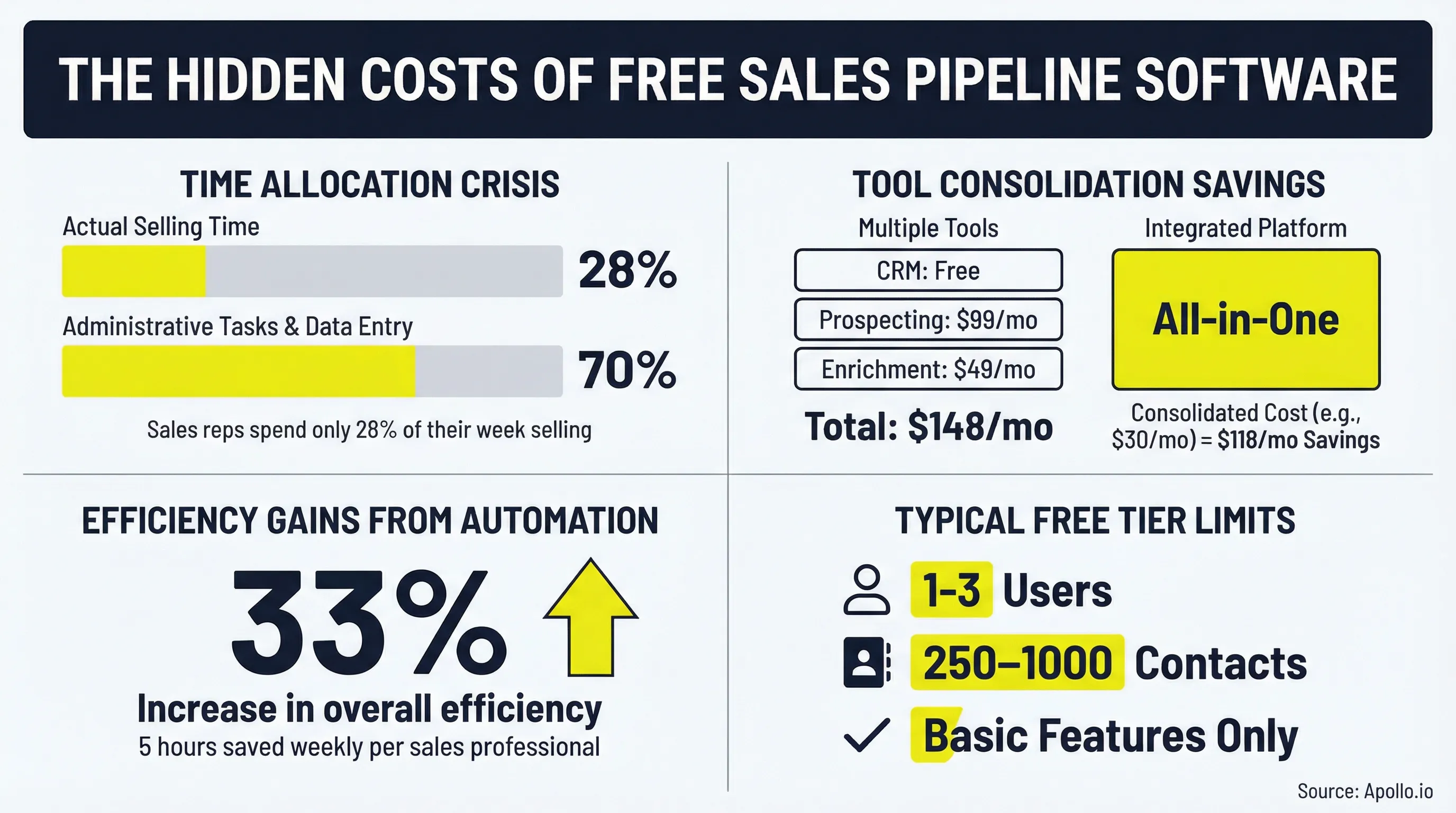
- "Free" typically means 1-3 user limits, restricted features, and limited storage—understand these constraints before committing
- The hidden cost of multiple tools (prospecting + CRM + enrichment) often exceeds a single integrated platform
- Focus on core pipeline needs first: visual deal tracking, activity logging, basic reporting, and contact management
What Sales Pipeline Software Actually Does
A sales pipeline is a visual representation of your sales process that tracks potential customers through different stages of your sales cycle. It shows where each prospect stands, from initial contact to closed deal, allowing you to forecast revenue and identify bottlenecks.
The software provides five non-negotiable features for effective pipeline management:
- Visual pipeline view: Kanban-style boards or stage-based displays that show deal progression at a glance
- Deal tracking and progression: Detailed records of each opportunity with status updates and next steps
- Activity logging: Automatic capture of emails, calls, meetings, and other prospect interactions
- Basic reporting and forecasting: Insights into conversion rates, deal velocity, and revenue projections
- Contact and company data management: Centralized storage of prospect information and communication history
According to industry research, sales reps spend only 28% of their week actually selling, with 70% consumed by administrative tasks and data entry. Pipeline management software addresses this inefficiency by automating repetitive work and providing instant visibility into deal status.
Without proper pipeline management, sales teams struggle with lost opportunities due to inconsistent follow-up, poor visibility into the sales process, difficulty forecasting revenue, and inefficient resource allocation. The right software eliminates these challenges by providing frameworks for tracking and managing potential deals.
Understanding "Free" in Sales Software
When evaluating free options, you need to understand what "free" actually means in the software landscape. Most platforms operate on a freemium model with specific limitations:
User limitations: Free tiers typically support 1-3 seats, making them suitable for solo entrepreneurs or very small teams but requiring upgrades as you grow.
Feature restrictions: Advanced capabilities like custom reporting, workflow automation, multiple pipelines, or AI-powered insights usually require paid plans.
Storage and contact limits: Many platforms cap the number of contacts, deals, or data storage available on free plans, forcing upgrades when you hit these thresholds.
Support limitations: Free users often receive community-based support rather than direct access to customer success teams.
The hidden costs of "free" tools extend beyond these obvious restrictions. Integration limitations force manual work between systems. Data quality issues require cleanup time. Migration costs accumulate when you outgrow the tool and need to switch platforms.
Free makes sense when you're validating your sales process, operating with a small team, or building initial momentum before investing in premium solutions. However, if you're already generating consistent revenue or managing a growing pipeline, the time saved by paid features often justifies the investment.
Apollo: All-in-One Sales Intelligence Platform
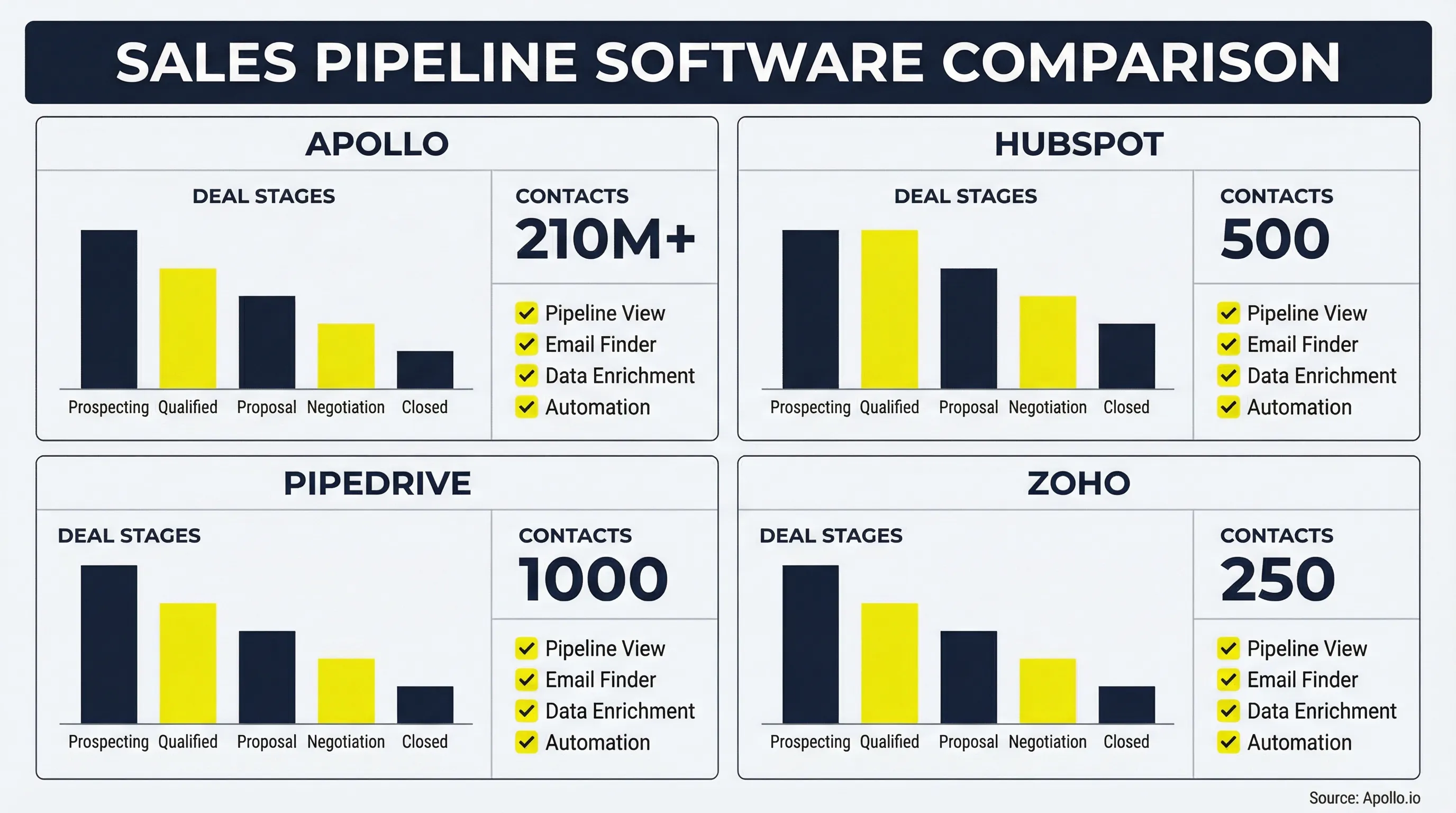
Apollo stands out as the only platform combining prospecting data with pipeline management in a single interface. While other tools simply store contact information, Apollo provides access to 210M+ verified B2B contacts, eliminating the need for separate prospecting tools.
This integration solves a critical problem: most CRM platforms are just data storage systems. You still need tools to find prospects, verify emails, and enrich contact records. Apollo handles all these functions natively, reducing tool sprawl and the associated costs.
The free tier includes unlimited email finder credits with verification, basic pipeline management, email sequences, and a Chrome extension for prospecting directly from LinkedIn or company websites. This means you can identify prospects, capture their information, and begin outreach without switching between multiple platforms.
For SDR teams and outbound-focused sales organizations, this all-in-one approach dramatically reduces complexity. Instead of managing integrations between a prospecting tool, data enrichment service, and CRM, you operate from a single dashboard with consistent data across all functions.
The platform's limitations on the free tier primarily affect advanced analytics and reporting. Basic pipeline visibility remains robust, but custom dashboards and detailed performance metrics require paid plans. For teams just establishing their outbound motion, these advanced features aren't immediately necessary.
When to upgrade: As your volume exceeds free limits or you need advanced enrichment capabilities like technographic data, buying signals, or intent scoring, paid plans provide these insights while maintaining the integrated workflow you've already established.
Standalone Pipeline Tools vs. All-in-One Sales Platforms
The integration tax—hidden costs of multiple tools—significantly impacts total cost of ownership. When you use separate systems for prospecting, pipeline management, and data enrichment, you face several challenges:
Data sync issues: Information doesn't flow seamlessly between systems, creating inconsistencies and requiring manual reconciliation. A contact updated in your prospecting tool may not reflect changes in your CRM, leading to outdated information and poor prospect experiences.
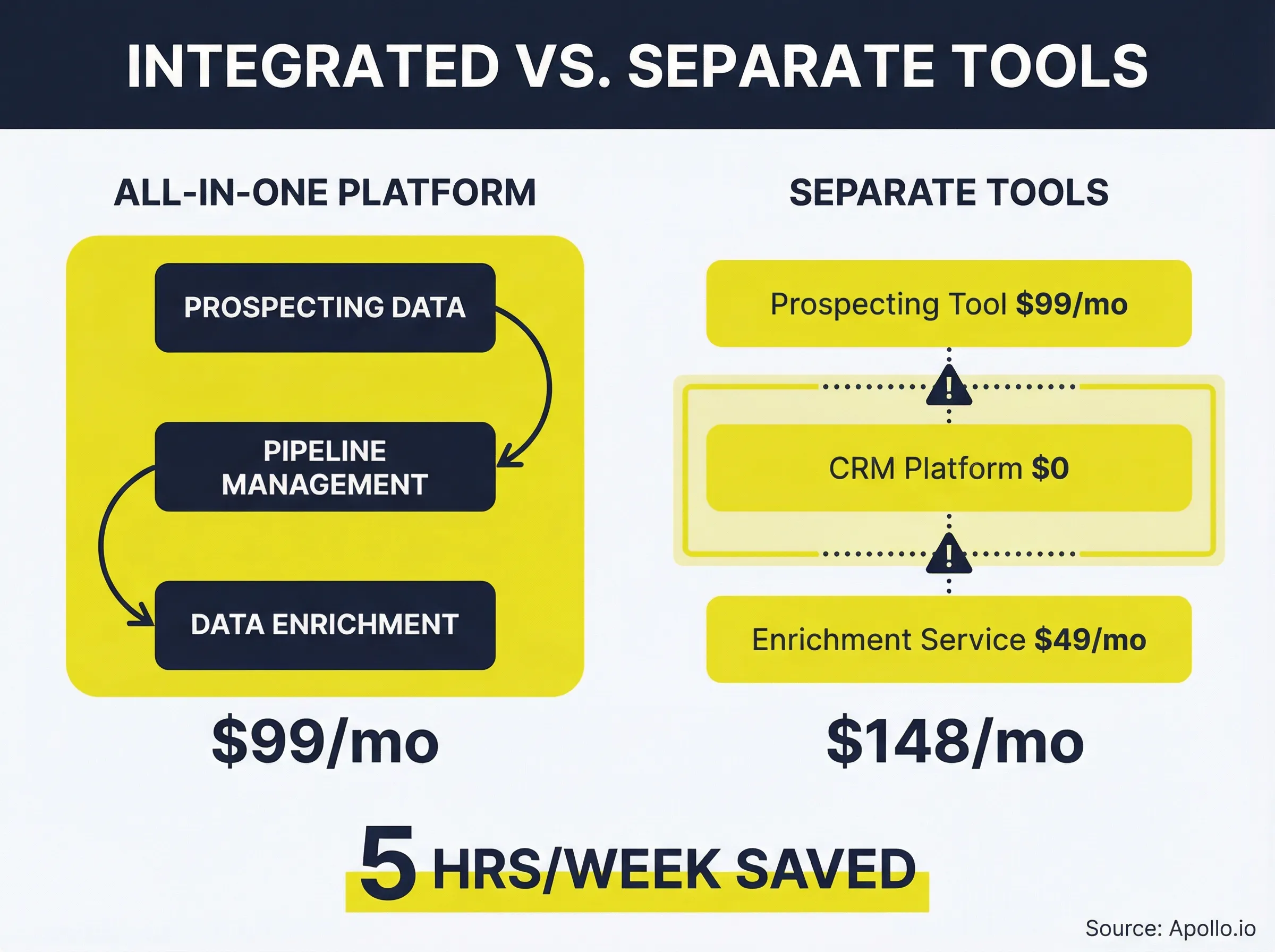
Manual data entry: Moving information between systems consumes time that could be spent selling. Research shows sales professionals save approximately 5 hours weekly through automation—time currently lost to manual data transfer.
Context switching: Moving between multiple interfaces reduces productivity and increases cognitive load. Each tool switch requires reorientation and breaks focus from the primary task of engaging prospects.
Compounding costs: A "free" CRM plus $99/month prospecting tool plus $49/month enrichment service equals $148/month—often more expensive than an integrated platform providing all three functions.
Standalone tools make sense when you already have a strong prospecting process, operate an inbound-only sales motion, or have existing data sources working effectively. In these scenarios, adding a simple pipeline tracker complements rather than duplicates existing capabilities.
All-in-one platforms win when building outbound motion from scratch, managing small teams wearing multiple hats, or prioritizing data quality alongside pipeline tracking. The integrated approach eliminates integration headaches while providing consistent data across all functions.
The data quality factor deserves special attention. Pipeline software is only as good as the data feeding into it. Most free CRM platforms lack data enrichment, requiring separate tools that add cost and complexity. Platforms with built-in enrichment provide immediate value by automatically completing contact records and maintaining data accuracy.

Automate Prospecting and Pipeline Management Together
Free plan available - no credit card required. Get unlimited email finder credits, pipeline tracking, and sequences in one dashboard. Spend less time on admin work and more time closing deals.
Get Started Free →8 Key Criteria for Evaluation
1. User Limits vs. Team Size: Calculate the true cost per user when you exceed the free tier. If you have five reps and the free plan supports three users, understand the pricing jump for those additional seats. Consider your growth trajectory—will you outgrow the free tier in three months or three years?
2. Contact and Deal Capacity: Map limits to your current pipeline volume and factor in growth plans. A 250-contact limit may seem adequate today but become constraining quickly as your business scales. Hidden limits in "unlimited" plans often appear in fine print—read terms carefully.
3. Data Quality and Enrichment: Determine whether the platform includes contact data or just provides storage. Email verification capabilities prevent bounce rates from damaging sender reputation. Company data enrichment automatically populates firmographic information, saving manual research time. Platforms with built-in data access provide immediate advantages over those requiring separate prospecting tools.
4. Integration Ecosystem: Verify email provider compatibility, calendar sync capabilities, and prospecting tool integrations if data isn't built-in. API access enables custom integrations for specific workflows. Native integrations perform better than connector-based solutions through services like Zapier.
5. Reporting and Forecasting: Assess pipeline visibility features, conversion rate tracking, and deal velocity metrics. Custom report builders (rare on free tiers) provide flexibility to answer specific business questions. Standard reports may suffice initially but become limiting as your analysis needs grow.
6. Mobile Functionality: Evaluate whether the platform offers native apps or mobile web interfaces. Offline capabilities matter for field sales teams without consistent connectivity. Deal updating on the go prevents information delays that slow pipeline progression.
7. Automation Capabilities: Review workflow automation limits, email sequence integration, task automation, and lead routing rules. Teams using automation tools experience a 33% increase in overall efficiency—capabilities worth prioritizing even on free tiers.
8. Scalability and Upgrade Path: Understand what happens when you outgrow the free tier. Review pricing jumps between tiers, feature unlocks on paid plans, and data migration ease. Choosing a platform with a clear upgrade path prevents disruptive platform changes later.
Common Implementation Mistakes
Choosing based on features you won't use: Feature lists look impressive, but unused capabilities add complexity without value. Focus on core pipeline needs first: visual deal tracking, activity logging, basic reporting, and contact management. Advanced features matter only if you'll actually use them.
Ignoring data quality requirements: A pipeline is useless without good contact data. Factor in the cost of separate data tools when evaluating "free" CRM platforms. Integrated approaches eliminate this issue by providing prospecting data and pipeline management together.
Not calculating total cost of ownership: Consider integration costs, training time, admin overhead, and migration costs when outgrowing the tool. A seemingly expensive integrated platform often costs less than multiple "free" tools when you account for these hidden expenses.
Picking tools before defining process: Map your sales process first, then find tools that fit. Forcing your process into a tool's predetermined structure creates friction and reduces adoption. The best software adapts to your workflow rather than dictating it.
Overlooking team adoption factors: Consider complexity versus team technical skills, change management requirements, and available training resources. The most powerful platform delivers no value if your team won't use it. Sometimes simpler tools with higher adoption outperform feature-rich platforms that overwhelm users.
Getting Started: Implementation Best Practices
Week 1: Setup and Configuration
- Define pipeline stages based on your actual sales process, not generic templates
- Set up integrations with email, calendar, and other essential tools
- Import existing contacts and deals from spreadsheets or previous systems
- Configure user permissions to control data access and maintain security
Week 2: Team Training
- Conduct hands-on workshops focused on daily workflows rather than exhaustive feature tours
- Create process documentation that connects software features to business outcomes
- Establish data entry standards to maintain consistency across the team
- Identify power users who can provide peer support during adoption
Week 3-4: Adoption and Refinement
- Monitor usage metrics to identify adoption barriers
- Address friction points quickly before they become ingrained habits
- Refine workflows based on actual usage patterns rather than theoretical ideals
- Celebrate early wins to build momentum and demonstrate value
Critical success factors include executive sponsorship (leadership must use the system), clear usage expectations (define what "good" looks like), regular pipeline reviews (make the data actionable), and continuous optimization (treat implementation as ongoing rather than one-time).
According to industry data, 77% of sales professionals say their organization plans to invest more in sales intelligence tools including CRMs. This investment only delivers returns when implementation follows structured approaches that prioritize adoption over features.
Making the Right Choice for Your Team
The best sales pipeline software depends on your specific situation. If you need prospecting capabilities alongside pipeline management, Apollo's integrated approach eliminates tool sprawl and reduces total cost. For teams with existing data sources and simple pipeline tracking needs, standalone CRM platforms may suffice.
The key decision framework: Start with your sales motion (outbound vs. inbound), assess your team size and growth trajectory, evaluate data quality needs, and calculate total cost of ownership including hidden expenses.
Don't let perfect be the enemy of good. The best tool is the one your team will actually use. Start with a free tier, evaluate for 30 days with real workflows, and make informed decisions based on actual experience rather than feature comparisons.
For teams building outbound sales motions or seeking to consolidate multiple tools, explore Apollo's sales pipeline builder to experience integrated prospecting and deal management. The combination of data access and deal tracking in a single platform addresses the core challenge most free CRM tools ignore: you can't manage a pipeline without prospects to fill it.
Join 550K+ companies scaling smarter with Apollo
Don't settle for CRM platforms that only store data. Apollo combines verified contact data, pipeline management, and outreach automation in one platform—eliminating the hidden costs of multiple tools. Start building your pipeline today with our free plan.
Get Started Free →